Workspaces
Application Architect Dashboard
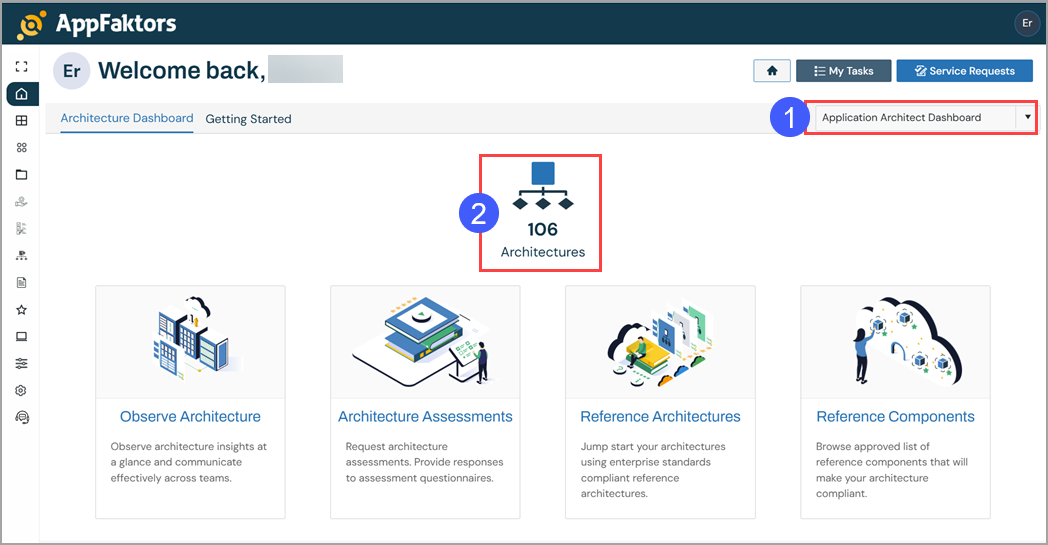
Depending on your role, you may see the Architectures tile on your Home page.
Accessing the Architecture Dashboard
To access the Architecture dashboard:
- Ensure that you have selected Application Architect Dashboard from the Dashboard drop-down menu.
- Click Architectures.
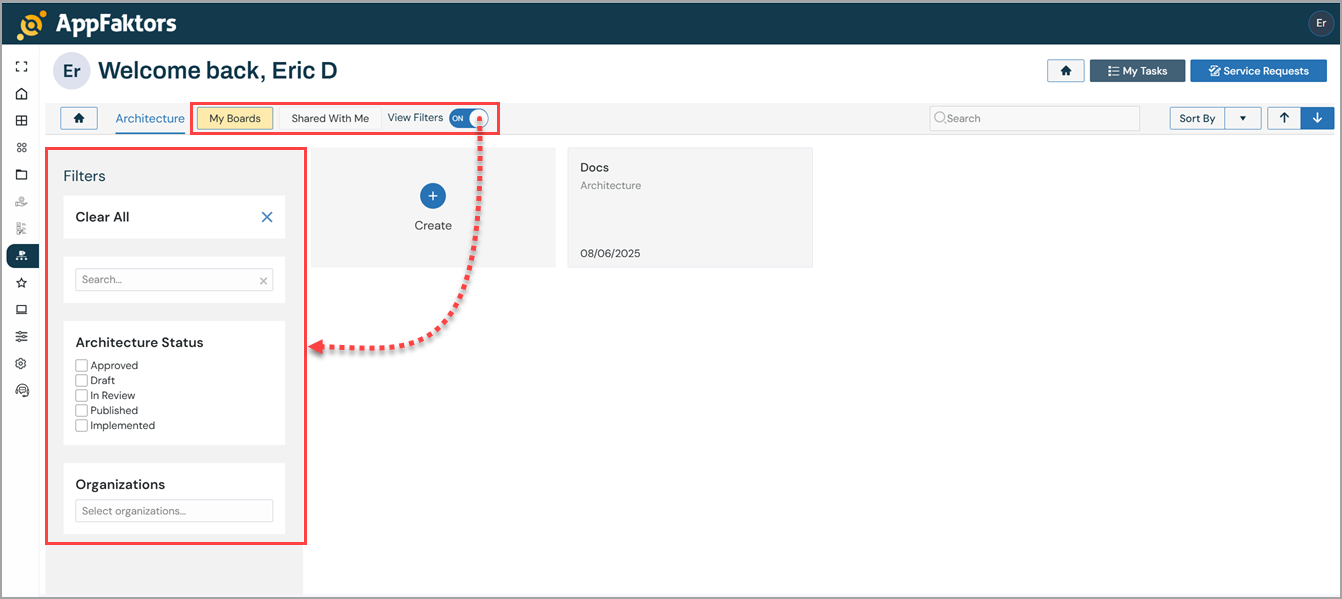
Once you select the Architecture tile, your personalized dashboard appears, featuring My Boards, Shared With Me , and View Filters.
My Boards - Requests that you created or imported and are responsible for managing.
Shared With Me - Requests that others created and have shared with you because of your role, permissions, or involvement in the process.
View Filters - Filter controls you use to narrow or expand the list of architectures that appear on your dashboard. Toggle it on to display the filter controls.
Accessing the Architecture Workspace
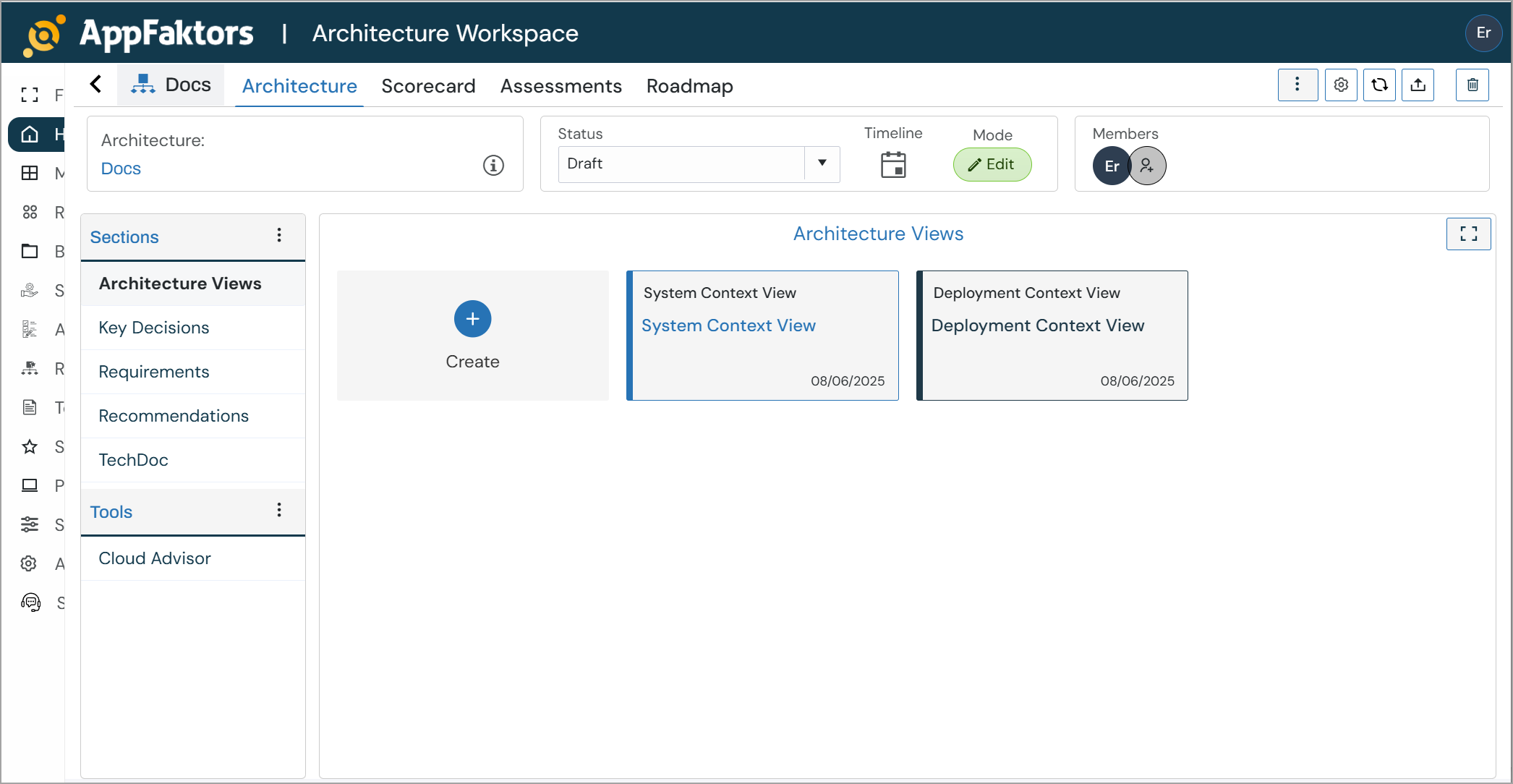
The AppFaktors Architecture Workspace is a comprehensive platform for designing, managing, and documenting enterprise architectures. This workspace provides tools for creating architecture blueprints, managing requirements, conducting assessments, and tracking project roadmaps.
To access the Architecture Workspace:
Access the Architecture Dashboard as decribed above.
Select an architecture from the tiled list. The Architecture Workspace appears:
Main Navigation
The workspace is organized into several key tabs:
- Architecture: Core architecture design and documentation
- Scorecard: Performance metrics and KPIs
- Assessments: Architecture evaluation and reviews
- Roadmap: Project timeline and milestones
Overview Section
- High-level architecture summary and key information
- Main entry point for architecture documentation
Architecture Name
- Enter a descriptive name for your architecture
- This will be the primary identifier across the workspace
Application Status
- Draft: Work in progress, not yet finalized
- Active: Currently implemented and operational
- Archived: No longer in use but retained for reference
Organization
- Select the organizational unit responsible for this architecture
- Helps with governance and accountability
Business Owner
- Assign the business stakeholder responsible for architecture decisions
- Typically a senior business leader or product owner
Architect
- Designate the technical architect leading the design
- Usually a senior technical professional or enterprise architect
Business Criticality Levels
Choose the appropriate criticality level for your architecture:
- Archive: Legacy systems with minimal business impact
- Operational: Standard business operations support
- Important: Critical business functions that require high availability
Architecture Icon
Adding an Icon
- Click the Add Icon placeholder in the center panel
- Upload a custom image or select from the icon library
- Icons help with visual identification in architecture catalogs
Description Fields
Business Description
- Describe the business value and purpose of the architecture
- Include key business drivers and objectives
- Explain how this architecture supports organizational goals
Technical Description
- Provide technical overview of the architecture
- Include key technologies, patterns, and design principles
- Document technical constraints and requirements
Architecture Views Section
The Architecture Views section provides a comprehensive visual modeling environment for creating and managing different architectural perspectives. This section allows you to create multiple diagrams that represent various aspects of your system architecture. See also Architecture > Architecture Overview Diagrams for more information.
Available View Types
System Context View
- High-level view showing the system boundary and external interfaces
- Illustrates how the system interacts with external actors and systems
- Provides stakeholder perspective of system scope and dependencies
System Detail View
- Detailed internal view of system components and their relationships
- Shows internal modules, services, and data flows
- Technical perspective for development and implementation teams
Data Flow View
- Visual representation of how data moves through the system
- Shows data transformations, storage points, and processing steps
- Critical for understanding information architecture and data governance
Deployment Context View
- Infrastructure and deployment environment perspective
- Shows physical or virtual infrastructure components
- Illustrates deployment topology and environment boundaries
Deployment Detail View
- Detailed view of deployment configurations for specific environments
- Environment-specific configurations (Dev Env, Prod Env)
- Shows server instances, containers, networks, and deployment artifacts
Creating Architecture Views
Adding a New View
- Navigate to the Architecture Views section
- Click the Create button (+ icon)
- Select the appropriate view type from the available options
- Provide a descriptive name for the view
- Choose the relevant environment or context (if applicable)
- Begin creating your diagram using the visual modeling tools
View Management
- Each view displays its creation or last modified date (08/13/2025 format)
- Views are organized in a card-based layout for easy navigation
- Color-coded borders help distinguish between different view types:
- Blue: System and context views
- Green: Deployment views
- Orange: Data flow views
View Categories
Context Views
- System Context View: External system perspective and boundaries
- Deployment Context View: Infrastructure context and environment overview
Detail Views
- System Detail View: Internal system architecture and components
- Deployment Detail View: Specific environment deployment configurations
- Available for multiple environments (Dev Env, Prod Env, etc.)
Specialized Views
- Data Flow View: Information flow and data processing patterns
- Custom view types can be added based on organizational needs
Best Practices for Architecture Views
View Organization
- Start with context views to establish system boundaries
- Create detail views for implementation guidance
- Maintain separate deployment views for each environment
- Use consistent naming conventions across views
Diagram Standards
- Follow organizational modeling standards and notations
- Include legends and annotations for clarity
- Keep diagrams focused and avoid overcrowding
- Regular updates to reflect current state
Collaboration
- Share views with relevant stakeholders
- Version control for significant changes
- Peer review process for critical diagrams
- Export capabilities for documentation and presentations
View Interaction
Navigation Between Views
- Click on any view card to open the diagram editor
- Use breadcrumb navigation to switch between views
- Full-screen mode available for detailed editing
Diagram Editing
- Drag-and-drop interface for component placement
- Standard architectural notation support
- Real-time collaboration features
- Auto-save functionality
Export and Sharing
- Export individual views or complete view sets
- Multiple formats supported (PNG, SVG, PDF)
- Integration with documentation generation
- Stakeholder sharing and review workflows
Objectives Section
The Objectives section enables you to define, track, and measure the success of your architecture through structured goal-setting and key results monitoring. This section follows an OKR-style approach linking high-level objectives to measurable outcomes.
Service Objectives & Key Results
The main interface displays your architecture's objectives in a structured format with the following components:
Objective Management
- View all defined objectives for your architecture
- Search functionality to quickly find specific objectives
- Refresh capability to update metrics and values
- Library integration for adding pre-defined objective templates
Creating Custom Objectives
Adding a New Objective
- Click Create button to open the Custom Objective dialog
- Complete the required fields in the objective configuration form
- Define associated key results and success metrics
- Save the objective to add it to your architecture
Objective Configuration Fields
Basic Information
- Objective: Clear, concise statement of what you want to achieve
- Level: Hierarchical level of the objective (e.g., Artifact, System, Organization)
Classification Fields
- Factor: The primary area this objective addresses (required field)
- Examples: Cost, Performance, Security, Scalability, Reliability
- Organization: The organizational unit responsible for this objective
- Business Criticality: Impact level (None, Low, Medium, High, Critical)
- Business Owner: Stakeholder accountable for achieving the objective
Key Results Management
Defining Key Results
- Key Result: Specific, measurable outcome that indicates objective achievement
- Expected Value: Target metric or value you aim to achieve
- Value: Current actual value or measurement
- Add Key Result: Use the "+ Key Result" button to add multiple measurable outcomes
Key Result Examples Based on the interface, a sample objective might be:
- Objective: "Optimize application infrastructure costs and enhance cost efficiency while ensuring performance and reliability"
- Key Result: "Monitor and track the overall infrastructure costs and measure the achieved reduction through optimization techniques like rightsizing instances, using reserved instances, or leveraging auto-scaling capabilities"
Objective Categories and Factors
Common Objective Factors
- Cost: Financial optimization and budget management
- Performance: Speed, throughput, and response time improvements
- Security: Risk reduction and compliance achievement
- Reliability: Uptime, availability, and stability metrics
- Scalability: Growth capacity and elasticity measures
- Compliance: Regulatory and standard adherence
Tracking and Monitoring
Progress Measurement
- Set expected values for each key result
- Track actual values against expectations
- Monitor progress over time
- Visual indicators for achievement status
Value Updates
- Regular updates to actual values
- Historical tracking of progress
- Variance analysis between expected and actual results
- Trend analysis and reporting
Best Practices for Objectives
SMART Objectives
- Specific: Clear and well-defined goals
- Measurable: Quantifiable key results
- Achievable: Realistic and attainable targets
- Relevant: Aligned with business strategy
- Time-bound: Defined timeframes for achievement
Key Result Guidelines
- Quantitative: Use numbers, percentages, or measurable units
- Actionable: Outcomes that can be influenced by architecture decisions
- Limited: 3-5 key results per objective for focus
- Baseline: Establish current state before setting targets
Integration with Architecture
Linking to Architecture Components
- Objectives should align with architecture decisions
- Key results should be measurable through system metrics
- Regular assessment during architecture reviews
- Integration with monitoring and observability tools
Stakeholder Alignment
- Clear ownership assignment for each objective
- Regular communication of progress to stakeholders
- Alignment with broader organizational goals
- Cross-functional collaboration for achievement
Common Objective Templates
Cost Optimization
- Reduce infrastructure costs by X%
- Optimize licensing costs through consolidation
- Achieve target cost per transaction
Performance Enhancement
- Improve response time to under X milliseconds
- Achieve 99.9% uptime target
- Scale to handle X concurrent users
Security Improvement
- Reduce security vulnerabilities by X%
- Achieve compliance certification
- Implement zero-trust architecture principles
Troubleshooting
Required Field Validation
- Ensure all required fields are completed (Factor is mandatory)
- Validate that key results are measurable
- Check that expected values are realistic
Common Issues
- Missing Factor: Factor field is required for all objectives
- Vague Objectives: Ensure objectives are specific and actionable
- Unmeasurable Key Results: All key results must be quantifiable
Key Decisions Section
The Key Decisions section provides a comprehensive framework for documenting and managing Architectural Decision Records (ADRs). This section helps maintain a historical record of important architecture decisions, their rationale, and consequences.
Key Decisions Overview
Decision Management Interface
- Tabular view displaying all architecture decisions
- Search functionality to quickly locate specific decisions
- Ask AI feature for intelligent decision support and recommendations
- Refresh button to update decision status and information
- Create button to add new architectural decisions
Decision Table Columns
- Name: Title and brief description of the decision
- Last Updated: Timestamp showing when the decision was last modified
- Status: Current state of the decision (Proposed, Accepted, Rejected, etc.)
- Decider: Person or role responsible for making the decision
Creating and Editing Key Decisions
Decision Structure Each architectural decision follows a structured format with the following components:
Basic Information
- Name: Clear, concise title for the decision
- Last Update: Automatic timestamp tracking
- Status: Decision lifecycle state
- Proposed: Under consideration
- Accepted: Approved and being implemented
- Rejected: Not approved
- Superseded: Replaced by a newer decision
- Decider: Individual or role accountable for the decision
Decision Content Sections
Scope
Define the boundaries and applicability of the decision:
- System-wide: Affects the entire architecture
- Component-specific: Limited to particular modules
- Technology-specific: Focused on specific tech choices
Technical Story
Rich text editor for documenting the technical background:
- Current technical situation and challenges
- Technical requirements and constraints
- Integration considerations with existing systems
- Performance, security, and compliance requirements
Example from interface: "As the system architect, I need to determine the optimal cloud deployment strategy for our Main System and its integration with the External System, considering factors such as scalability, security, and compliance requirements."
Context and Problem Statement
Detailed explanation of the situation requiring a decision:
- Business and technical context
- Problem definition and scope
- Stakeholder concerns and requirements
- Timeline and resource constraints
Example from interface: "The architecture consists of a Main System that needs to interact with Users and an External System. We need to decide on the best cloud deployment strategy that balances performance, security, and cost-effectiveness while ensuring seamless integration between components."
Decision Drivers
Factors influencing the decision with priority indicators:
- Scalability requirements (with priority controls)
- Data security and compliance needs
- Integration complexity with External System
- Cost considerations
- Performance and latency requirements
Each driver can be prioritized and weighted according to business importance.
Considered Options
Document all alternatives evaluated:
Option Categories
- Good Options (Green indicators): Viable solutions with benefits
- Bad Options (Red indicators): Ruled out with clear reasoning
For each option include:
- Option Name: Clear identifier
- Description: Detailed explanation of the approach
- Pros and Cons: Benefits and drawbacks
- Implementation considerations
Example options from interface:
- Public Cloud (AWS): "Deploy the system on Amazon Web Services public cloud infrastructure"
- Hybrid Cloud: Various hybrid deployment strategies
- On-premises: Traditional data center deployment
Decision Outcome
Document the final decision:
- Chosen Solution: Selected option with rationale
- Implementation approach
- Timeline and milestones
- Success criteria
Positive and Negative Consequences
Track the results of the decision:
Positive Consequences
- Benefits realized from the decision
- Performance improvements
- Cost savings or efficiency gains
- Risk mitigation achieved
Negative Consequences
- Challenges or issues encountered
- Unexpected costs or complexity
- Technical debt incurred
- Mitigation strategies for negative impacts
Advanced Features
AI-Powered Decision Support
- Ask AI functionality provides intelligent recommendations
- Analysis of decision drivers and options
- Best practice suggestions based on similar scenarios
- Risk assessment and mitigation recommendations
Decision Tracking and Governance
- Status progression tracking
- Approval workflows
- Stakeholder notification
- Decision review cycles
Template and Standardization
- Pre-defined decision templates
- Consistent formatting across decisions
- Required vs. optional sections
- Validation rules for completeness
Form Summary Panel
The right-side panel provides quick access to:
- Options: Count of alternatives considered
- Drivers: Number of decision factors
- Selected: Chosen option summary
- Last Modified: Recent update timestamp
- Status: Current decision state
Best Practices for Key Decisions
Decision Documentation
- Clear Problem Statement: Define the issue requiring a decision
- Comprehensive Options: Evaluate multiple alternatives
- Objective Criteria: Use measurable decision drivers
- Stakeholder Input: Include relevant perspectives
- Future Review: Plan for decision reassessment
Decision Governance
- Proper Authorization: Ensure appropriate decision-maker involvement
- Documentation Standards: Follow consistent ADR format
- Communication: Share decisions with affected teams
- Traceability: Link decisions to requirements and objectives
- Lifecycle Management: Update status as decisions evolve
Integration with Architecture Workflow
Decision Linkage
- Connect decisions to specific architecture views
- Reference in requirements and objectives
- Include in risk assessments
- Factor into cost analysis
Change Management
- Track decision impacts on existing architecture
- Manage dependencies between decisions
- Coordinate with deployment and roadmap planning
- Maintain decision history and evolution
Common Decision Categories
Technology Choices
- Cloud platform selection
- Database technology decisions
- Integration pattern choices
- Security framework selection
Architecture Patterns
- Microservices vs. monolithic architecture
- Synchronous vs. asynchronous communication
- Data storage and management strategies
- Deployment and scaling approaches
Implementation Strategies
- Development methodology choices
- Testing and quality assurance approaches
- DevOps and CI/CD pipeline decisions
- Monitoring and observability strategies
Requirements Section
The Requirements section provides comprehensive functionality for managing, tracking, and documenting functional and non-functional requirements throughout the architecture lifecycle. This section enables structured requirement management with full traceability and integration capabilities.
Requirements Management Interface
Main Dashboard Features
- Search Functionality: Quickly locate specific requirements using the search bar
- Ask AI: Intelligent assistance for requirement analysis and recommendations
- Refresh: Update requirement status and synchronize data
- Column Grouping: Drag column headers to group requirements by specific attributes
- Add from Library: Import pre-defined requirement templates and standards
Table Structure The requirements are displayed in a structured table format with the following columns:
- Id: Unique identifier for each requirement (e.g., REQ-0001Z, REQ-0004B)
- Type: Classification of the requirement (Functional, Non-functional, Security, etc.)
- Name: Descriptive title of the requirement
- Component Name: Associated architecture component
- Recommendation: Implementation timeline (Immediate Term, Long Term, etc.)
- Status: Current state (Recommended, In Progress, Completed, etc.)
- SDLC: Software Development Life Cycle phase mapping
Requirement Actions and Workflows
Management Actions
- Create: Add new requirements manually
- Import: Bulk import requirements from external sources
- Push to Roadmap: Integrate requirements into project timeline
- Push To Standard: Promote requirements to organizational standards
Creating and Editing Requirements
Requirement Dialog Structure When creating or editing a requirement, the following fields are available:
Basic Information
- Type: Dropdown selection for requirement classification
- Priority: Level of importance (LOW, MEDIUM, HIGH, CRITICAL)
- Complexity: Implementation difficulty (LOW, MEDIUM, HIGH)
- Is ASR?: Architectural Significant Requirement indicator (YES/NO)
Requirement Details
- Requirement Name: Clear, concise title describing the requirement
- Model: Associated architecture model or framework
- Component: Specific component this requirement applies to
Content Sections
Description Rich text area for detailed requirement specification:
- Business justification and context
- Functional or technical specifications
- Constraints and limitations
- Acceptance criteria
Example from interface: "Verify the application has additional authorization (such as step up or adaptive authentication) for lower value systems, and / or segregation of duties for high value applications to enforce anti-fraud controls as per the risk of application and past fraud."
Expected Solution Expandable section for documenting the anticipated implementation approach:
- Technical solution overview
- Architecture patterns to be used
- Integration requirements
- Performance considerations
Best Practices Dedicated section for capturing implementation guidelines:
- Industry standards and frameworks
- Organizational policies and procedures
- Quality gates and checkpoints
- Testing and validation approaches
Example from interface: "Testing - Work as expected"
Requirement Examples from Interface
Security Requirements
- REQ-0001Z: "64-128 Character Password Length Restriction"
- REQ-0004B: "Additional Authorization for Lower-Value Systems and Segregation of Duties for High-Value Applications"
- REQ-0006B: "Automated Data Retention for Sensitive Personal Information"
- REQ-0004E: "Proper Sanitization of Untrusted HTML Input"
Requirement Classification
Functional Requirements
- User interface specifications
- Business logic requirements
- Data processing needs
- Integration specifications
Non-Functional Requirements
- Performance criteria
- Security specifications
- Scalability requirements
- Reliability and availability targets
Architectural Significant Requirements (ASR)
- Requirements that significantly impact architecture decisions
- Cross-cutting concerns affecting multiple components
- Quality attributes with system-wide implications
- Constraints that drive architectural choices
Priority and Complexity Management
Priority Levels
- LOW: Nice-to-have features, future enhancements
- MEDIUM: Important functionality, planned iterations
- HIGH: Critical business requirements, current release
- CRITICAL: Essential system requirements, immediate implementation
Complexity Assessment
- LOW: Simple implementation, minimal dependencies
- MEDIUM: Moderate complexity, some integration required
- HIGH: Complex implementation, significant architectural impact
Component Mapping
Component Association
- Link requirements to specific architecture components
- Ensure traceability from business needs to implementation
- Support impact analysis for component changes
- Enable requirement-based testing strategies
Recommendation Timeline
Implementation Phases
- Immediate Term: Current sprint or release cycle
- Short Term: Next 1-3 months
- Medium Term: 3-6 months planning horizon
- Long Term: 6+ months strategic planning
Status Tracking
Requirement Lifecycle States
- Draft: Initial requirement definition
- Recommended: Approved for implementation
- In Progress: Active development
- Testing: Under validation
- Completed: Successfully implemented
- Deferred: Postponed to future releases
- Rejected: Not approved for implementation
SDLC Integration
Development Phase Mapping
- Requirements Analysis: Initial capture and specification
- Design: Architecture and detailed design
- Development: Implementation phase
- Testing: Validation and verification
- Deployment: Production release
- Maintenance: Ongoing support and updates
Advanced Features
AI-Powered Requirements Analysis
- Ask AI for requirement completeness assessment
- Automated requirement conflict detection
- Best practice recommendations
- Requirement pattern recognition
Library Integration
- Access to standard requirement templates
- Industry-specific requirement catalogs
- Organizational requirement libraries
- Compliance framework mappings
Roadmap Integration
- Push requirements to project roadmaps
- Timeline and milestone planning
- Resource allocation support
- Dependency management
Best Practices for Requirements Management
Requirement Quality
- Clear and Specific: Avoid ambiguous language
- Measurable: Define quantifiable acceptance criteria
- Testable: Enable verification and validation
- Traceable: Link to business objectives and architecture components
- Complete: Include all necessary details for implementation
Requirement Organization
- Consistent Naming: Use clear, descriptive requirement names
- Proper Classification: Assign appropriate types and priorities
- Component Mapping: Link to relevant architecture components
- Regular Review: Update status and priority as needed
- Stakeholder Alignment: Ensure business and technical consensus
Lifecycle Management
- Version Control: Track requirement changes over time
- Impact Analysis: Assess effects of requirement modifications
- Progress Monitoring: Regular status updates and reporting
- Quality Gates: Review and approval processes
- Compliance Tracking: Ensure regulatory and standard adherence
Integration with Architecture Workflow
Cross-Section Linkage
- Connect requirements to objectives and key results
- Reference in architectural decisions (ADRs)
- Include in risk assessments and mitigation strategies
- Factor into cost analysis and resource planning
Change Management
- Track requirement evolution and rationale
- Manage dependencies between requirements
- Coordinate with architecture views and documentation
- Support continuous improvement processes
Recommendations Section
The Recommendations section provides a centralized hub for managing architecture improvement suggestions, best practices, and optimization opportunities. This section enables systematic tracking and implementation of recommendations across different architectural factors and components.
Recommendations Management Interface
Main Dashboard Features
- Search Functionality: Locate specific recommendations using the search bar
- Collapse/Expand: Control table view density for better readability
- Refresh: Update recommendation status and synchronize data
- Column Grouping: Drag column headers to group recommendations by specific attributes
- Push to Roadmap: Integrate recommendations into project planning and timelines
Table Structure The recommendations are displayed in a structured table format with the following columns:
- Factor: Category or domain of the recommendation (Security, Cost Optimization, Performance, etc.)
- Recommendation: Detailed description of the suggested improvement or action
- Component Name: Associated architecture component or environment (e.g., Prod Env, Dev Env)
- Recommendation: Implementation timeline classification
- Status: Current state of the recommendation
- SDLC Phase: Software Development Life Cycle phase where the recommendation applies
Recommendation Categories (Factors)
Security Recommendations Focus on improving system security posture through various measures:
- Identity and access management improvements
- Network security enhancements
- Data protection and encryption
- Security monitoring and logging
- Compliance and governance controls
Cost Optimization Recommendations Target financial efficiency and resource optimization:
- Infrastructure rightsizing
- Reserved instance utilization
- Auto-scaling implementations
- Database optimization strategies
- Resource consolidation opportunities
Performance Recommendations Address system performance and scalability improvements:
- Application optimization
- Database performance tuning
- Caching strategies
- Load balancing enhancements
- Monitoring and alerting improvements
Additional Factor Categories
- Reliability: High availability and disaster recovery improvements
- Scalability: Capacity planning and elastic scaling
- Compliance: Regulatory and standard adherence
- Maintainability: Code quality and technical debt reduction
- Integration: API and service connectivity enhancements
Implementation Timeline Classification
Short Term
- Immediate implementation opportunities (1-3 months)
- Quick wins with minimal complexity
- Low-risk improvements with high impact
- Resource-light implementations
Medium Term
- Planned improvements (3-6 months)
- Moderate complexity implementations
- Requires coordination across teams
- Strategic enhancements with measurable benefits
Long Term
- Strategic initiatives (6+ months)
- Complex architectural changes
- Significant resource investment
- Major system transformations
Status Tracking
Recommendation Lifecycle States
- Recommended: Identified and approved for consideration
- In Progress: Active implementation underway
- Under Review: Evaluation and assessment phase
- Completed: Successfully implemented
- Deferred: Postponed to future planning cycles
- Rejected: Not approved for implementation
Component and Environment Mapping
Environment-Specific Recommendations
- Production Environment (Prod Env): Live system improvements
- Development Environment (Dev Env): Development workflow enhancements
- Testing Environment: Quality assurance optimizations
- Staging Environment: Pre-production improvements
Component-Level Targeting
- Database layer recommendations
- Application tier improvements
- Infrastructure optimizations
- Network and security enhancements
- Integration and API improvements
SDLC Phase Integration
Development Phase Alignment
- Planning: Strategic recommendations for upcoming cycles
- Design: Architecture and pattern improvements
- Development: Code quality and implementation practices
- Testing: Quality assurance and validation enhancements
- Deployment: Release and operational improvements
- Maintenance: Ongoing optimization and monitoring
Advanced Features
Roadmap Integration
- Push to Roadmap functionality enables seamless project planning
- Timeline coordination with development cycles
- Resource allocation and capacity planning
- Dependency management across recommendations
Grouping and Organization
- Drag-and-drop column grouping for custom views
- Filter by factor, status, or timeline
- Sort by priority or implementation complexity
- Bulk operations for multiple recommendations
Analytics and Reporting
- Track implementation progress across categories
- Monitor cost savings and performance improvements
- Generate compliance and governance reports
- Measure return on investment for implemented recommendations
Best Practices for Recommendations Management
Recommendation Quality
- Specific and Actionable: Clear implementation steps and outcomes
- Measurable Impact: Quantifiable benefits and success criteria
- Risk Assessment: Understand potential impacts and mitigation strategies
- Resource Planning: Realistic effort estimates and resource requirements
- Stakeholder Alignment: Business and technical consensus on priorities
Categorization and Prioritization
- Consistent Factor Assignment: Use standardized categories for better organization
- Timeline Realism: Align implementation timelines with organizational capacity
- Impact vs. Effort Analysis: Balance quick wins with strategic improvements
- Dependency Mapping: Understand interconnections between recommendations
- Regular Review Cycles: Periodic assessment and reprioritization
Implementation Coordination
- Cross-Team Collaboration: Engage relevant stakeholders and implementers
- Progress Tracking: Regular status updates and milestone monitoring
- Change Management: Proper communication and training for implemented changes
- Success Measurement: Post-implementation validation and benefit realization
- Continuous Improvement: Learn from implementation experiences
Integration with Architecture Workflow
Cross-Section Linkage
- Connect recommendations to identified risks and mitigation strategies
- Reference in architectural decisions and rationale
- Align with objectives and key results
- Factor into cost analysis and budget planning
Governance and Compliance
- Ensure recommendations align with organizational policies
- Track regulatory and standard compliance improvements
- Maintain audit trails for implemented changes
- Support architecture review and approval processes
Automation and Intelligence
AI-Powered Recommendations
- Automated suggestion generation based on architecture analysis
- Pattern recognition for common improvement opportunities
- Best practice recommendations from industry standards
- Intelligent prioritization based on business impact
Integration with Assessment Tools
- Automatic recommendation generation from security assessments
- Performance analysis driving optimization suggestions
- Cost analysis identifying savings opportunities
- Compliance gaps triggering improvement recommendations
The Recommendations section serves as a strategic tool for continuous architecture improvement, enabling organizations to systematically enhance their systems while maintaining alignment with business objectives and technical constraints.
Policies Section
The Policies section provides comprehensive functionality for managing organizational governance rules, compliance frameworks, and architectural standards. This section enables structured policy management with full traceability to control objectives and implementation actions.
Policies Management Interface
Main Dashboard Features
- Search Functionality: Locate specific policies using the search bar
- Refresh: Update policy status and synchronize with compliance frameworks
- Expandable Policy List: View policies with expand/collapse functionality for detailed information
- Action Management: Track implementation actions and recommendations for each policy
Table Structure The policies are displayed in a hierarchical format with the following columns:
- Name: Policy title with expandable details
- Recommendation: Implementation guidance and suggested actions
- Action: Current implementation status and required activities
Policy Structure and Organization
Policy Hierarchy Policies are organized with expandable sections that allow detailed drill-down:
- Main Policy: High-level governance statement
- Sub-policies: Specific implementation requirements
- Control Objectives: Detailed compliance requirements
- Associated Controls: Specific technical and procedural controls
Creating and Managing Policies
Policy Dialog Structure When creating or editing a policy, the following sections are available:
Metadata Tab
Basic Information
- Code #: Unique identifier for the policy (e.g., PR.MA, IM.RP, etc.)
- Name: Descriptive title of the policy
- Factor: Classification category (Security, Compliance, Operations, Risk Management, etc.)
- Author: Policy creator or responsible party
- Function: Primary purpose or objective (Protect, Detect, Respond, Recover, etc.)
- Status: Implementation state with ACTIVE/INACTIVE toggle
Description Rich text area for comprehensive policy documentation:
- Policy statement and objectives
- Scope and applicability
- Implementation requirements
- Compliance obligations
- Enforcement mechanisms
Control Objectives Tab
Objectives Management
- Code #: Unique identifier for each control objective
- Name: Detailed description of the control requirement
Control Framework Integration The Control Objectives section provides detailed mapping to compliance frameworks:
Mitigation Controls Table showing controls mapped to the policy objective:
- Control #: Unique control identifier
- Control Name: Descriptive name of the control
- Control Group: Functional category (e.g., Business Continuity Management, Identity & Access Management)
- Control Catalog: Source framework (e.g., Cloud Controls Matrix, NIST frameworks)
Additional Control Categories
- Evaluation Rules: Assessment and measurement criteria
- Remediation Rules: Corrective action procedures
- Monitoring Controls: Ongoing compliance verification
Policy Categories (Factors)
Security Policies
- Information security governance
- Access control and identity management
- Data protection and privacy
- Incident response and recovery
- Risk assessment and management
Compliance Policies
- Regulatory compliance requirements
- Industry standard adherence
- Audit and assessment procedures
- Documentation and reporting standards
- Certification maintenance
Operational Policies
- System maintenance and updates
- Change management procedures
- Business continuity planning
- Disaster recovery protocols
- Performance monitoring standards
Risk Management Policies
- Risk identification and assessment
- Mitigation strategy implementation
- Continuous monitoring procedures
- Escalation and reporting protocols
- Regular review and updates
Control Framework Integration
Supported Frameworks
- Cloud Controls Matrix: Cloud-specific security controls
- NIST Frameworks: Federal cybersecurity standards
- ISO Standards: International compliance requirements
- Industry-Specific: Sector-specific regulations and standards
Control Mapping
- Control Groups: Organized by functional areas
- Control Catalogs: Source framework identification
- Implementation Guidance: Specific technical requirements
- Assessment Criteria: Compliance measurement standards
Function Classifications
Protect
- Preventive controls and safeguards
- Access control and authentication
- Data encryption and protection
- System hardening procedures
Detect
- Monitoring and surveillance controls
- Anomaly detection systems
- Audit logging and analysis
- Threat intelligence integration
Respond
- Incident response procedures
- Escalation and notification protocols
- Containment and mitigation actions
- Communication and coordination
Recover
- Business continuity procedures
- Disaster recovery protocols
- System restoration processes
- Lessons learned integration
Implementation and Tracking
Status Management
- Active: Currently enforced policies
- Inactive: Policies under review or deprecated
- Draft: Policies in development
- Retired: Historical policies for reference
Recommendation Integration
- Link policies to specific implementation recommendations
- Track compliance through actionable items
- Monitor policy effectiveness through metrics
- Generate compliance reports and dashboards
Action Tracking
- Implementation milestones and deadlines
- Responsible parties and accountability
- Progress monitoring and reporting
- Exception handling and approval processes
Best Practices for Policy Management
Policy Development
- Clear Objectives: Define specific, measurable policy goals
- Stakeholder Engagement: Include relevant business and technical teams
- Risk-Based Approach: Prioritize based on organizational risk appetite
- Framework Alignment: Map to recognized compliance standards
- Regular Review: Establish periodic policy assessment cycles
Implementation Strategy
- Phased Rollout: Implement policies in manageable phases
- Training and Awareness: Ensure stakeholder understanding
- Monitoring and Measurement: Track compliance and effectiveness
- Continuous Improvement: Update based on lessons learned
- Exception Management: Handle legitimate policy exceptions
Compliance Management
- Control Mapping: Link policies to specific technical controls
- Evidence Collection: Maintain audit trails and documentation
- Assessment Procedures: Regular compliance verification
- Reporting and Communication: Stakeholder updates and dashboards
- Remediation Planning: Address compliance gaps promptly
Integration with Architecture Workflow
Cross-Section Linkage
- Reference policies in architectural decisions and rationale
- Connect to security risks and mitigation strategies
- Align with objectives and compliance requirements
- Factor into cost analysis for compliance investments
Governance and Oversight
- Policy approval workflows and authorization
- Regular policy review and update cycles
- Compliance monitoring and reporting
- Exception approval and risk acceptance processes
Automation and Intelligence
- Automated policy compliance checking
- Integration with security and monitoring tools
- Policy violation detection and alerting
- Compliance dashboard and metrics
The Policies section serves as the foundation for organizational governance, ensuring that architectural decisions align with regulatory requirements, industry standards, and organizational risk management objectives.
Security Risks Section
The Security Risks section provides comprehensive security risk management capabilities for identifying, assessing, and mitigating security threats within your architecture. This section leverages both automated analysis through DFD evaluation with architecture rules and AI-powered cloud advisory services to ensure comprehensive security coverage.
Security Risks Management Interface
Main Dashboard Features
- Risk Overview: Display total risk count (e.g., "Security Risks - 10 Risks")
- Search Functionality: Locate specific risks using the search bar
- Refresh: Update risk assessments and synchronize with analysis tools
- Dataflow Analysis: Expandable dataflow sections for component-specific risk analysis
- Push to Roadmap: Integrate security risks and mitigation actions into project planning
Risk Table Structure The security risks are displayed in a structured table format with the following columns:
- Name: Risk identifier and descriptive title (e.g., A09:2021-Security Logging and Monitoring Failures)
- Component: Associated architecture component (Store Form Data, Web, App, DB, etc.)
- Status: Current risk mitigation status
- Severity/Impact/Likelihood: Risk assessment indicators (H - High, P - Possible, M - Medium)
Risk Identification Methods
DFD (Data Flow Diagram) Evaluation
- Architecture Rules Analysis: Automated evaluation of data flows against security rules
- Component-Level Assessment: Risk identification at individual component level
- Flow-Based Analysis: Security risks identified through data flow patterns
- Rule-Based Detection: Pre-configured security rules for common threat patterns
AI Cloud Advisor
- Automated Risk Detection: Machine learning-based threat identification
- Cloud-Specific Risks: Specialized analysis for cloud deployment patterns
- Best Practice Validation: Comparison against industry security standards
- Continuous Monitoring: Ongoing risk assessment as architecture evolves
Risk Categories and Classification
OWASP-Based Risk Classification The system uses standardized risk identifiers based on security frameworks:
- A09:2021: Security Logging and Monitoring Failures
- A01:2021: Broken Access Control
- A06:2021: Vulnerable and Outdated Components
- A07:2021: Identification and Authentication Failures
- A03:2021: Injection vulnerabilities
- A05:2021: Security Misconfiguration
- A04:2021: Insecure Design
- A08:2021: Software and Data Integrity Failures
- A10:2021: Server-Side Request Forgery (SSRF)
- A02:2021: Cryptographic Failures
Component-Specific Risks
- Store Form Data: Data storage and handling risks
- Web: Web application layer vulnerabilities
- App: Application logic and processing risks
- DB: Database security and access control risks
- Submit Request/Get Response: API and communication risks
Detailed Risk Assessment
Risk Details Dialog When viewing or editing a specific risk, the following information is available:
Risk Classification
- Mitigation Decision: Strategic approach to risk handling
- Status: Current mitigation status (Open, In Progress, Resolved, Accepted)
- Inherent Risk: Original risk level before mitigation (High, Medium, Low)
- Residual Risk: Remaining risk after mitigation measures
- Severity: Technical impact level (High, Medium, Low)
- Impact: Business impact assessment (High, Medium, Low)
- Likelihood: Probability of risk occurrence (High, Possible, Low)
Risk Documentation
- Description: Comprehensive risk description with rich text formatting
- Impact Description: Detailed analysis of potential business and technical impacts
- Component Analysis: Expandable sections for component-specific risk details
- Root Cause Analysis: Identification of underlying vulnerability causes
Mitigation Management
Mitigation Strategy
- Mitigation Control: Primary control measures and safeguards
- Requirement: Specific requirements for risk mitigation
- Mitigation Type: Category of mitigation approach (Control, Process, Technical)
- Name: Descriptive name of the mitigation measure
- Status: Implementation status of mitigation actions
- Severity/Impact: Assessment of mitigation effectiveness
Component-Level Mitigation
- Store Form Data: Component-specific mitigation strategies
- Root Cause Identification: "Log Injection-Tampering-Forging" analysis
- Targeted Controls: Specific security controls for identified vulnerabilities
Risk Assessment Framework
Severity Levels
- High: Critical risks requiring immediate attention
- Medium: Significant risks requiring planned mitigation
- Low: Minor risks for future consideration
Impact Categories
- High: Severe business disruption or data compromise
- Medium: Moderate business impact or limited exposure
- Low: Minimal impact with contained exposure
Likelihood Assessment
- High: Very likely to occur without mitigation
- Possible: Moderate probability of occurrence
- Low: Unlikely to occur under normal circumstances
Integration with Architecture Workflow
DFD-Based Risk Analysis
- Dataflow Mapping: Visual representation of data flows and security boundaries
- Architecture Rule Validation: Automated checking against security policies
- Component Interaction Analysis: Risk assessment of component communications
- Data Path Security: End-to-end security analysis of data processing flows
AI-Powered Analysis
- Cloud Advisor Integration: Leverage AI for comprehensive risk identification
- Pattern Recognition: Identify security anti-patterns and vulnerabilities
- Best Practice Comparison: Compare architecture against security benchmarks
- Continuous Assessment: Ongoing risk evaluation as architecture evolves
Roadmap Integration
- Push to Roadmap: Convert risk mitigation actions into project tasks
- Timeline Planning: Schedule security improvements and implementations
- Resource Allocation: Plan security-related development and remediation work
- Progress Tracking: Monitor mitigation implementation progress
Risk Management Best Practices
Risk Identification
- Comprehensive Analysis: Use both DFD evaluation and AI advisory services
- Regular Assessment: Periodic risk reviews as architecture evolves
- Component Coverage: Ensure all architecture components are analyzed
- Threat Modeling: Systematic identification of potential attack vectors
- Continuous Monitoring: Ongoing risk assessment and detection
Risk Assessment
- Standardized Scoring: Use consistent severity, impact, and likelihood scales
- Business Context: Consider business impact alongside technical risk
- Threat Intelligence: Incorporate current threat landscape information
- Risk Aggregation: Understand cumulative risk across components
- Prioritization: Focus on highest impact and likelihood combinations
Mitigation Strategy
- Defense in Depth: Implement multiple layers of security controls
- Risk-Based Approach: Prioritize mitigation based on risk assessment
- Control Effectiveness: Measure and validate mitigation control performance
- Residual Risk: Understand and accept remaining risk after mitigation
- Cost-Benefit Analysis: Balance security investment with risk reduction
Compliance and Governance
Security Framework Alignment
- OWASP Integration: Leverage OWASP Top 10 and security frameworks
- Industry Standards: Align with relevant security standards and regulations
- Control Mapping: Map risks to specific security controls and requirements
- Audit Support: Maintain documentation for security audits and assessments
Risk Governance
- Risk Ownership: Clear assignment of risk management responsibilities
- Approval Workflows: Risk acceptance and mitigation approval processes
- Reporting: Regular risk reporting to stakeholders and management
- Communication: Effective risk communication across teams and organizations
The Security Risks section serves as a comprehensive security management platform, enabling organizations to proactively identify, assess, and mitigate security threats while maintaining clear visibility into their overall security posture and risk landscape.
Costs Section
The Costs section provides comprehensive cost management and tracking capabilities for architecture-related expenses. This section enables detailed cost analysis, budgeting, and total cost of ownership calculations across different environments, components, and cost categories.
Costs Management Interface
Main Dashboard Features
- Environment Filter: Filter costs by specific environments (Prod Env, Dev Env, Test Env, etc.)
- Column Grouping: Drag column headers to group costs by specific attributes
- Cost Entry Management: Add, edit, and delete individual cost entries
- Import Functionality: Bulk import cost data from Excel files with advanced column mapping
Table Structure The costs are displayed in a structured table format with the following columns:
- Owning Entity: Organization or department responsible for the cost
- Cost Category: Type of cost (Development, Operations, License, etc.)
- Cost Model: Billing model (One-Time Fixed Cost, Monthly Subscription, etc.)
- Environment: Target environment for the cost
- Is Estimate: Indicator whether the cost is estimated or actual
- Cost: Monetary value of the expense
Adding Cost Entries
Add Cost Dialog When creating a new cost entry, the following fields are available:
Cost Classification
- Cost Category: Primary categorization of the expense
- Development Cost
- Incident Cost
- License Cost
- Operations Cost
- Resource Cost
- Storage Cost
- Support Cost
- Cost Group: Secondary grouping for organizational purposes
- Department-based groupings
- Project-based categorizations
- Resource group classifications
- Team-based allocations
Cost Models
- Fixed Monthly Cost: Recurring monthly expenses
- Monthly Subscription: Service-based monthly billing
- Fixed Yearly Cost: Annual recurring costs
- Yearly Subscription: Annual service subscriptions
- One-Time Fixed Cost: Single payment expenses
- Hourly Subscription: Usage-based hourly billing
Cost Details
- Service Name: Name of the service or resource incurring the cost
- Service Id: Unique identifier for the service
- Is Shared: Checkbox indicating if the cost is shared across multiple components
- Is Estimate: Checkbox indicating whether the cost is estimated or actual
- Environment: Target environment (Production, Development, Testing, etc.)
- Component: Associated architecture component
- Cost: Numerical value of the expense
Excel Import Functionality
Import TCO (Total Cost of Ownership) The import feature supports comprehensive cost data import from Excel files:
Import Process
- Upload: Drag and drop Excel file or browse to select file
- Map Columns: Advanced column mapping interface for data alignment
Expected Columns for Import
The import functionality recognizes the following column types:
- Entity Value: Cost ownership information
- Entity Type: Type of owning entity
- Cost Category: Primary cost classification
- Cost Group: Secondary cost grouping
- Cost: Monetary amount
- Cost Model: Billing model specification
- Service Name: Service or resource name
- Provider: Service provider information
- Environment Name: Target environment
- Component Name: Associated component
- SubCategory: Additional cost categorization
- Business Unit: Organizational unit information
Import Features
- Template Download: Download pre-formatted Excel template
- Column Mapping: Map imported columns to expected data fields
- Data Validation: Automatic validation of imported cost data
- Bulk Processing: Handle large cost datasets efficiently
Cost Analysis and Reporting
Environment-Based Analysis
- Production Environment: Live system operational costs
- Development Environment: Development and testing infrastructure costs
- Staging Environment: Pre-production environment expenses
- Cross-Environment: Shared services and resources
Cost Category Analysis
- Development Costs: Initial build and development expenses
- Operations Costs: Ongoing operational and maintenance expenses
- License Costs: Software licensing and subscription fees
- Resource Costs: Infrastructure and computing resource expenses
- Storage Costs: Data storage and backup expenses
- Support Costs: Technical support and maintenance contracts
Cost Model Analysis
- Recurring Costs: Monthly and yearly subscriptions and fixed costs
- One-Time Costs: Initial setup, licensing, and equipment purchases
- Usage-Based Costs: Variable costs based on consumption or usage
- Shared Costs: Expenses distributed across multiple components or projects
Cost Tracking and Monitoring
Estimate vs. Actual Tracking
- Estimated Costs: Projected expenses for budgeting and planning
- Actual Costs: Real expenses for accurate financial tracking
- Variance Analysis: Compare estimated vs. actual costs for budget control
- Trend Analysis: Track cost evolution over time
Component-Level Costing
- Direct Costs: Expenses directly attributable to specific components
- Shared Costs: Expenses allocated across multiple components
- Infrastructure Costs: Underlying platform and infrastructure expenses
- Service Costs: Application-level service and feature costs
Best Practices for Cost Management
Cost Categorization
- Consistent Classification: Use standardized cost categories across projects
- Granular Tracking: Capture costs at appropriate detail levels
- Environment Separation: Maintain separate cost tracking for each environment
- Regular Updates: Keep cost information current and accurate
- Shared Cost Allocation: Properly distribute shared expenses
Cost Planning and Budgeting
- Bottom-Up Estimation: Build estimates from component-level costs
- Historical Data: Leverage past cost data for future projections
- Contingency Planning: Include buffer for unexpected expenses
- Regular Review: Periodic cost review and budget reconciliation
- Optimization Opportunities: Identify cost reduction possibilities
Data Management
- Import Automation: Use Excel import for bulk cost data management
- Template Standardization: Maintain consistent import templates
- Data Validation: Verify imported cost data for accuracy
- Version Control: Track changes to cost estimates and actuals
- Audit Trail: Maintain records of cost data modifications
Integration with Architecture Workflow
Cross-Section Linkage
- Requirements Costing: Link costs to specific architecture requirements
- Decision Impact: Factor costs into architectural decision making
- Risk Assessment: Include cost risks in overall risk management
- Recommendation Prioritization: Use cost-benefit analysis for recommendations
Financial Governance
- Budget Approval: Cost approval workflows and authorization limits
- Cost Center Allocation: Proper assignment to organizational cost centers
- Financial Reporting: Integration with enterprise financial systems
- Compliance Tracking: Ensure adherence to financial policies and procedures
Total Cost of Ownership (TCO)
- Comprehensive Costing: Include all direct and indirect costs
- Lifecycle Analysis: Track costs across entire architecture lifecycle
- Comparative Analysis: Compare costs across different architecture options
- ROI Calculation: Support return on investment analysis for architecture decisions
The Costs section serves as a comprehensive financial management tool, enabling organizations to track, analyze, and optimize architecture-related expenses while maintaining clear visibility into total cost of ownership and budget performance.
TechDoc Section
The TechDoc section provides a comprehensive MDX-based documentation environment for creating, organizing, and maintaining technical documentation alongside your live architecture. This section enables keeping all technical non-structured documentation up-to-date and easily accessible for reference and collaboration.
TechDoc Interface Overview
Main Features
- MDX Editor: Advanced markdown editor with enhanced capabilities
- Folder Organization: Hierarchical document structure management
- Search Functionality: Quick document and content discovery
- Ask AI: Intelligent assistance for documentation creation and improvement
- Live Architecture Integration: Keep documentation synchronized with current architecture state
Document Management Tools
- New Folder: Create organizational folders for document categorization
- Create TechDoc: Add new technical documents
- Hide Empty: Toggle visibility of empty folders for cleaner navigation
- Search: Locate specific documents or content within documents
Document Organization Structure
Folder Hierarchy The TechDoc section uses a hierarchical folder structure for organization:
- Home: Root level for main architecture documentation
- System Architecture Documentation: Primary technical documentation folder
- Custom Folders: User-defined organizational categories
Document Navigation
- Breadcrumb Navigation: Clear path showing current document location
- Folder Tree: Left sidebar showing complete document structure
- Document Tabs: Multi-document editing capability
- Quick Access: Recently updated and frequently accessed documents
MDX Editor Capabilities
Rich Text Editing Features The MDX editor provides comprehensive formatting and content creation tools:
Text Formatting
- Bold, Italic, Underline text styling
- Multiple heading levels for document structure
- Code blocks and inline code formatting
- Quote blocks for highlighting important information
Content Organization
- Bullet Lists: Unordered list creation
- Numbered Lists: Ordered list formatting
- Block Types: Various content block options
- Table Creation: Structured data presentation
- Link Management: Internal and external link creation
Advanced Features
- Undo/Redo: Edit history management
- Code Integration: Syntax highlighting for technical content
- Media Embedding: Images, diagrams, and multimedia content
- Export Options: Various output formats for sharing and distribution
Document Types and Use Cases
System Architecture Documentation Comprehensive technical specifications including:
- Architecture Overview: High-level system design and components
- Key Components: Detailed component descriptions and interactions
- Authentication and Authorization: Security implementation details
- Integration Patterns: System connectivity and data flow patterns
Technical Specifications
- API documentation and interface specifications
- Database schemas and data models
- Configuration management procedures
- Deployment and infrastructure guides
Implementation Guides
- Step-by-step implementation procedures
- Best practices and coding standards
- Troubleshooting and debugging guides
- Performance optimization recommendations
Operational Documentation
- System maintenance procedures
- Monitoring and alerting configurations
- Backup and recovery processes
- Security protocols and compliance procedures
Live Architecture Integration
Up-to-Date Reference
- Dynamic Content: Documentation that reflects current architecture state
- Automatic Updates: Integration with architecture changes and decisions
- Cross-Referencing: Links between documentation and architecture components
- Version Synchronization: Ensure documentation matches implemented systems
Architectural Alignment
- Reference architecture views and diagrams within documentation
- Link to specific requirements and decisions
- Include policy and compliance documentation
- Connect to security risks and mitigation strategies
Collaborative Features
Multi-User Editing
- Real-time Collaboration: Multiple users editing simultaneously
- Update Tracking: "Updated on Aug 13, 2025" timestamp management
- Author Attribution: Track document creators and contributors
- Comment and Review: Collaborative feedback and approval processes
Version Control
- Document history and change tracking
- Revision comparison and rollback capabilities
- Branch and merge functionality for complex documents
- Audit trail for compliance and governance
Document Management Best Practices
Organization Strategy
- Logical Hierarchy: Create intuitive folder structures
- Consistent Naming: Use clear, descriptive document titles
- Regular Updates: Keep documentation current with architecture changes
- Cross-References: Link related documents and architecture elements
- Search Optimization: Use clear headings and keywords for discoverability
Content Quality
- Clear Structure: Use headings, lists, and formatting for readability
- Comprehensive Coverage: Include all necessary technical details
- Practical Examples: Provide code samples and configuration examples
- Visual Elements: Include diagrams, screenshots, and illustrations
- Regular Review: Periodic content validation and updates
Collaboration Guidelines
- Shared Standards: Establish documentation templates and styles
- Review Processes: Implement peer review and approval workflows
- Update Notifications: Communicate significant documentation changes
- Access Control: Manage permissions for sensitive technical information
- Integration Points: Connect with other architecture section updates
Advanced MDX Features
Interactive Content
- Embedded code examples with syntax highlighting
- Interactive diagrams and visualizations
- Dynamic content based on architecture parameters
- Live data integration from monitoring systems
Technical Documentation Standards
- API documentation with interactive examples
- Code snippets with copy functionality
- Configuration templates and examples
- Architecture decision records integration
Search and Discovery
Content Search
- Full-text Search: Find content across all documents
- Filtered Search: Search within specific folders or document types
- Tag-based Discovery: Organize content with metadata tags
- AI-Powered Suggestions: Intelligent content recommendations
Navigation Enhancement
- Table of Contents: Automatic generation for long documents
- Cross-References: Links between related sections and documents
- Bookmark Functionality: Save frequently accessed content
- Recent Activity: Track recently viewed and edited documents
Integration with Architecture Workflow
Documentation Lifecycle
- Creation: Start documentation during architecture design phase
- Development: Maintain documentation during implementation
- Deployment: Update documentation for production systems
- Maintenance: Ongoing updates and improvements
Quality Assurance
- Review Cycles: Regular documentation assessment and updates
- Accuracy Validation: Ensure documentation matches implemented systems
- Completeness Checks: Verify all technical aspects are documented
- Stakeholder Feedback: Incorporate user and developer input
Compliance and Governance
- Standards Adherence: Follow organizational documentation standards
- Audit Trails: Maintain records of documentation changes
- Access Controls: Manage permissions for sensitive technical content
- Regulatory Compliance: Meet industry-specific documentation requirements
The TechDoc section serves as the central repository for all technical documentation, providing a rich, collaborative environment that keeps pace with architectural evolution while maintaining comprehensive, up-to-date technical reference materials.
Tools Section
Cloud Advisor
- Cloud migration and optimization recommendations
- Best practices for cloud architectures
Right Sidebar - Management Actions
Task Management
Create Task Board
- Set up project management boards for architecture tasks
- Track progress and assign responsibilities
Create Deployment Board
- Manage deployment activities and schedules
- Track release cycles and environments
Collaboration
Request Peer Review
- Initiate peer review process for architecture validation
- Collaborate with other architects and stakeholders
Request Assessment
- Formal architecture assessment and evaluation
- Quality gates and compliance checks
Reporting
Export Report
- Generate comprehensive architecture documentation
- Various formats available (PDF, Word, etc.)
Settings
Architecture Settings
- Configure workspace preferences
- Manage permissions and access controls
Status and Timeline Management
Status Tracking
- Monitor architecture lifecycle status
- Track progress through different phases
Timeline Management
- Set key milestones and deadlines
- Visual timeline representation of architecture evolution
Mode Controls
- Edit Mode: Make changes to architecture documentation
- View Mode: Read-only access for stakeholders
Team Collaboration
- Members: View and manage team members with access
- Assign roles and responsibilities
- Collaborate in real-time
Best Practices
Documentation Standards
- Consistent Naming: Use clear, descriptive names for architectures
- Regular Updates: Keep documentation current with implementation
- Version Control: Track changes and maintain history
- Stakeholder Alignment: Ensure business and technical descriptions align
Collaboration Guidelines
- Regular Reviews: Schedule periodic peer reviews
- Clear Ownership: Assign clear business and technical owners
- Risk Management: Regularly update security risk assessments
- Cost Monitoring: Track and update cost estimates
Quality Assurance
- Assessment Cycles: Regular formal assessments
- Compliance Checks: Ensure policy adherence
- Performance Monitoring: Track against defined objectives
- Continuous Improvement: Act on recommendations
Common Workflows
Creating a New Architecture
- Navigate to Architecture Workspace
- Create new architecture with descriptive name
- Set initial status to "Draft"
- Assign business owner and architect
- Define business criticality level
- Add business and technical descriptions
- Upload representative icon
- Begin documenting sections (Overview, Objectives, etc.)
Architecture Review Process
- Complete initial documentation
- Request peer review from right sidebar
- Address feedback and comments
- Request formal assessment
- Update status based on assessment results
- Generate and distribute final report
Ongoing Management
- Regular status updates
- Timeline milestone tracking
- Cost and risk reassessment
- Documentation updates
- Team collaboration and communication
Troubleshooting
Common Issues
Cannot Edit Architecture
- Check if you're in Edit mode
- Verify you have appropriate permissions
- Ensure architecture is not locked by another user
Missing Tools
- Contact administrator to enable specific tools
- Check licensing and access permissions
Export Issues
- Verify all required fields are completed
- Check network connectivity
- Try different export formats
Support Resources
For additional support:
- Contact your system administrator
- Refer to AppFaktors documentation portal
- Submit support tickets through the help desk